
Today’s demands on a real estate professional are higher than ever. Meeting expectations in a “free shipping to your door, tomorrow” society can be taxing… until now.
Property Explorer’s Scheduled Searches Can Meet the Demands of:
- That buyer that needs a place right now
- That investor that is waiting for the right property, at the right time
- That new lead that wants to buy in the next year
- That seller that is watching the market to see how to prepare their home for going on the market
- That marketing plan you decided to create as a new year’s resolution to actively pursue a neighborhood with sold data
The needs of buyers and sellers can be met with Scheduled Searches inside Property Explorer from IRES MLS! Right now. No time to wait for shipping, or a knock at the front door.
Step 1: Create a Search
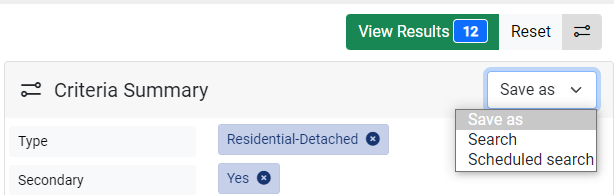
Inside Property Explorer, start your search with the criteria you need. When you find the search is just right, select the “Save As” dropdown menu and select “Scheduled Search.”
Step 2: Customize
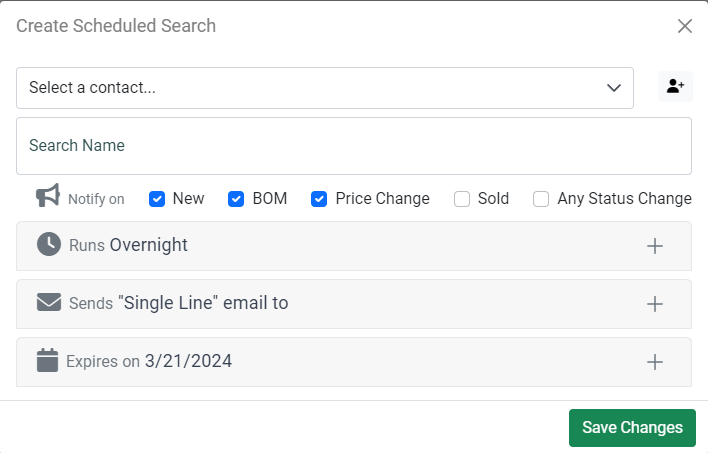
Once you select “Scheduled Search,” you will be prompted to customize your Scheduled Search with whom you want it to send to, as well as when. Defaults have been selected to save you time, or customize it to make it exactly the way you want it.
Step 3: Send Now or Later
Once you saved your changes, you can opt for one of two things:
- Search Manually Now to view and manually send any listings that match your search (it will not automatically send the first time), and send accordingly.
- Save your search, call it a day and let the Scheduled Search work its magic.
Learn More
If you are interested in learning more:
- Visit our Training Calendar for an upcoming Property Explorer class.
- Visit the Learning Center for more information
- Contact us or use our Virtual Assistant inside the IRES MLS app (bottom right corner, red chat button)
- Try doing it the old way (formerly known as Prospect Searches)
Nah, the new way is so much easier.
 IRES MLS: Come Home to Colorado